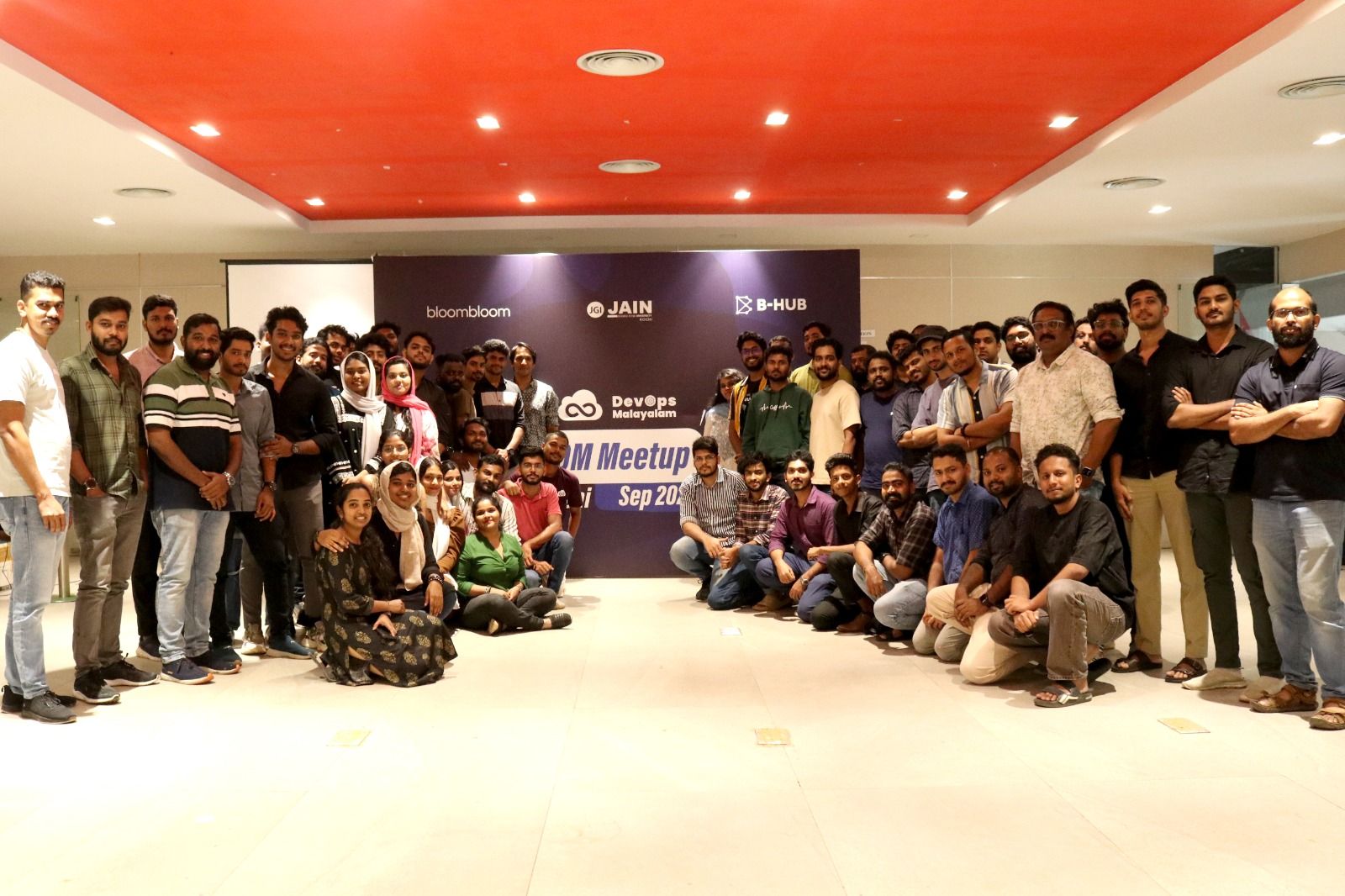
Topics Discussed:
- Introduction to Linux
- History & Architecture
- Why Learn Linux for DevOps
- Core Linux Concepts
- Terminal & Command Line Essentials
- Linux File System Structure
- Navigation & File Exploration
- File & Directory Management
- System & Resource Monitoring
- Searching & Filtering
- User & Group Management
- Package Management
- Linux in DevOps Workflows
- Learning Outcomes
Introduction: Why Linux?
Linux is a powerful, open-source operating system installable on almost any hardware – from personal computers to enterprise servers and embedded systems. Unlike Windows which focuses on a GUI, Linux is largely Command Line Interface (CLI) driven, making it the backbone of modern infrastructure.
- More efficient for system administrators
- Highly automatable via shell scripting
- Lightweight and performance-oriented
- Ideal for servers and cloud environments
- Gives users direct control over the system
Origin of Linux
Linus Torvalds created Linux in 1991 at age 21, starting as a personal hobby while working with MINIX. It grew through global contributions into one of the most widely used operating systems in the world.
What is the Kernel?
The kernel is the heart of the operating system. It acts as the middleman between physical hardware and software.Physical hardware devices such as a keyboard, hard disk, or network card send signals in binary (0s and 1s). The kernel receives these raw binary signals and translates them into meaningful instructions that software applications can understand and use. Without the kernel, software would have no way to communicate with the hardware beneath it.
- Heart of the OS – always running in the background
- Receives binary signals from physical hardware devices
- Translates hardware signals into software-understandable instructions
- Manages CPU, memory, devices, and system calls
- Acts as a bridge – hardware talks to kernel, kernel talks to software
Monolithic vs Microkernel Architecture
 In Linux monolithic architecture, the kernel handles everything directly – resulting in faster execution and efficient system control.
Why Learn Linux?
Linux is everywhere – Android smartphones, cloud infrastructure, smart TVs, DevOps environments, containers, virtualization, and even the Mars Ingenuity helicopter. For DevOps professionals it is essential because it is:
- Scriptable – automate repetitive tasks with shell scripts
- Automatable – integrates natively with CI/CD pipelines
- Highly stable – servers run for months without reboots
- Multi-user supported – ideal for team environments
- The foundation of cloud computing and modern infrastructure
Core Linux Concepts
1. Multi-User Support
Linux supports multiple simultaneous users. Every file and directory is assigned ownership across three levels:

2. File Permissions – rwx Model
Each file or directory carries three permission types per ownership level:
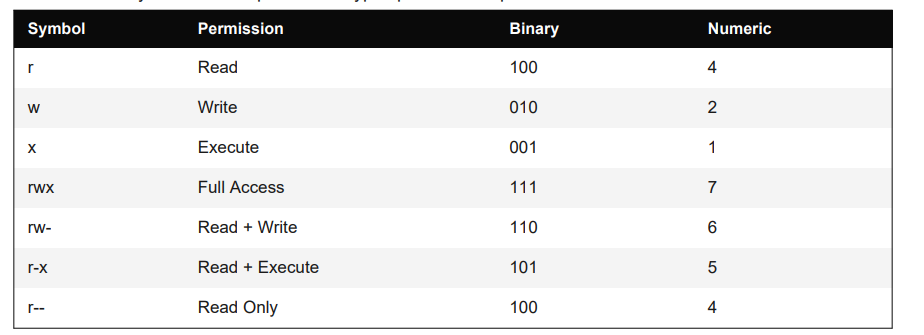
Common folder permissions: 755 (owner: rwx, group: r-x, others: r-x) and 750 (owner: rwx, group: r-x, others: none). These enforce the principle of least privilege.
3. Ownership Management
Change file or directory ownership using the chown command:

Terminal & Command Line
The Terminal is the primary communication channel between the user and the OS. Administrative tasks require elevated privileges via sudo, making Linux inherently secure by design.

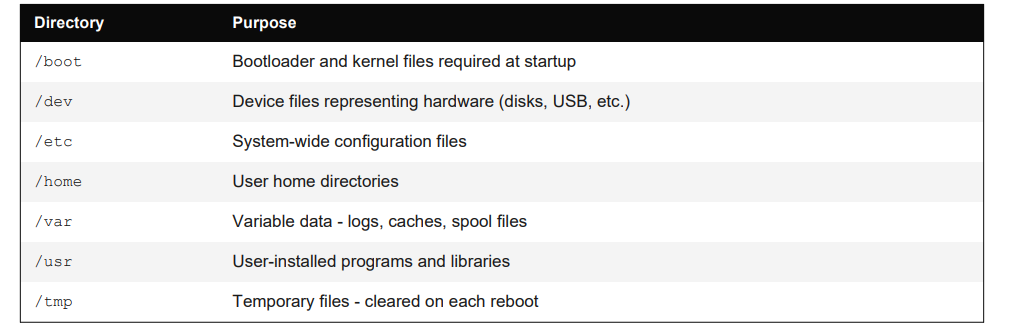
File System Structure
Linux uses a hierarchical directory structure rooted at /. Key directories
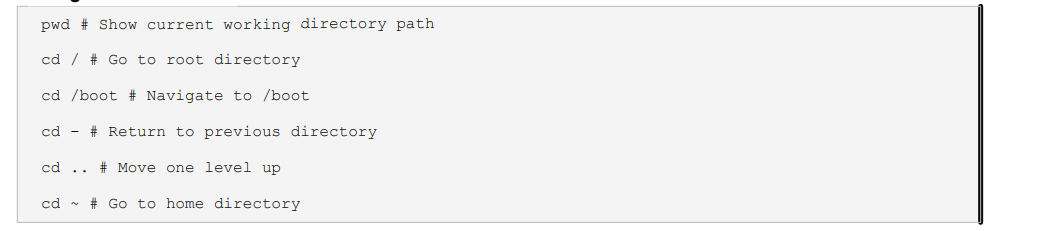
Navigation Commands
Listing & Viewing Files
The Terminal is the primary communication channel between the user and the OS. Administrative tasks require elevated privileges via sudo, making Linux inherently secure by design.

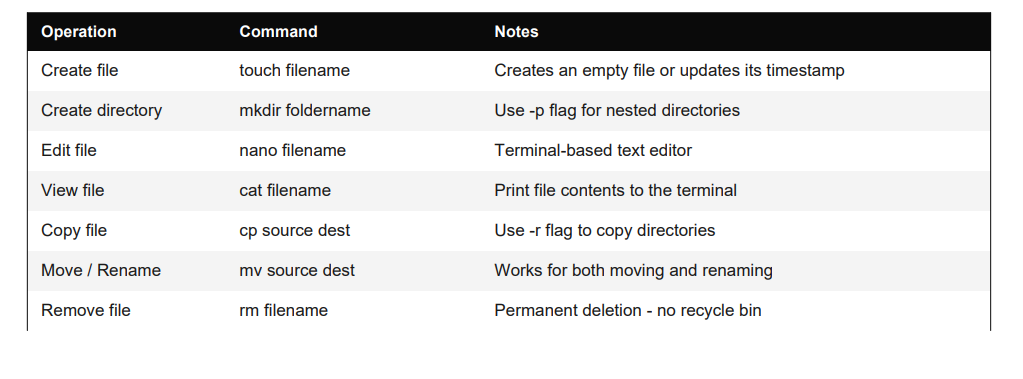
File & Directory Operations
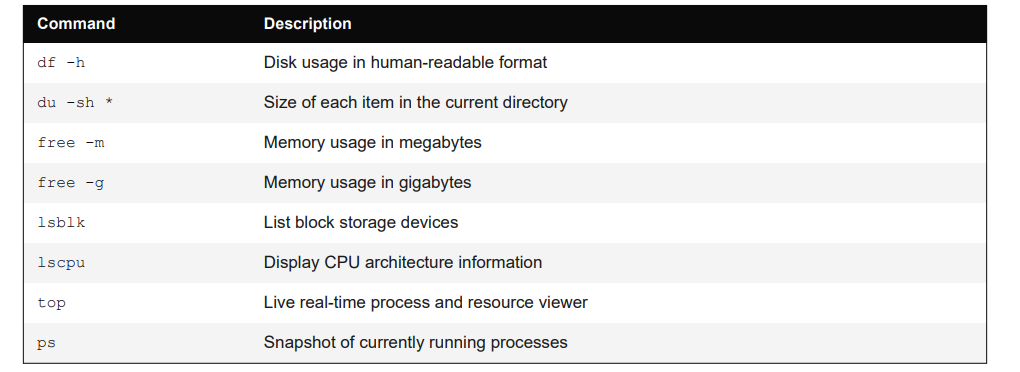
System & Storage Monitoring
Searching & Filtering

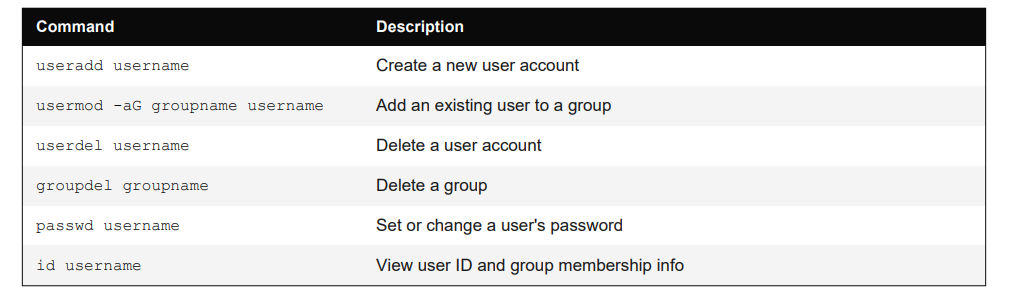
User & Group Management
Package Management
Installing software requires administrative privileges (sudo). APT is the standard package manager for Debian/Ubuntu-based systems:

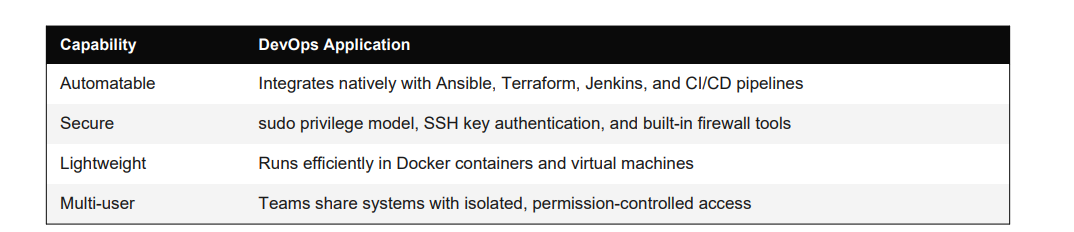
Why DevOps Loves Linux
Final Summary
Linux is not just an operating system – it is the foundation of modern computing infrastructure. From kernel architecture to file permissions, from system monitoring to user management, Linux provides precise control at every level. Understanding Linux fundamentals
equips professionals to:
-
- Navigate systems confidently with CLI tools
- Manage files, directories, and storage efficiently
- Secure environments using permissions and user controls
- Automate infrastructure with scripts and pipelines
- Operate effectively in DevOps and cloud environment
Linux knowledge is a critical skill for anyone looking to build a strong foundation in modern computing and infrastructure.